

Edit PDF Metadata — Free & Private
View and change a PDF’s hidden properties — title, author, subject, and creator — right in your browser. Your file is never uploaded. No accounts, no limits.
🏷️ Edit PDF metadata now →How to edit PDF metadata for free
- Open the Moriaki metadata editor in your browser.
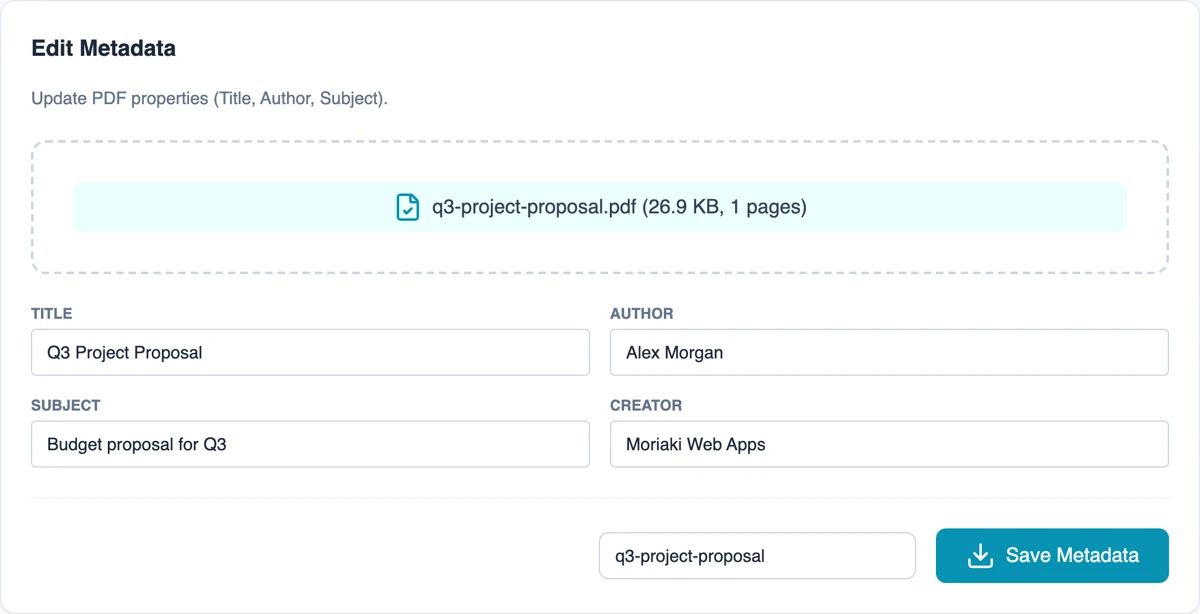
- Drag and drop your PDF — its current properties load automatically.
- Edit the Title, Author, Subject, and Creator fields.
- Click Save and download the updated PDF. Nothing is uploaded.
Why edit PDF metadata with Moriaki?
PDF metadata can reveal who created a file and when — details you may want to clean up before sharing. Moriaki reads and rewrites these properties locally in your browser, so the document never leaves your device.
Set a proper title and author for a professional document, or clear out leftover metadata for privacy — with no watermark and no sign-up.
What is PDF metadata?
Every document of this type carries a small set of properties alongside the pages you can see. They don’t appear when you read the file, but anyone who opens it can view them, usually under File → Properties or Document Properties in a reader app. These fields are part of the official file format standard, ISO 32000 (see the Library of Congress format description), and computers, document management systems and some search engines use them to describe what a file is. This tool lets you view and change four of the most important ones:
Title
The name of the document. Many reader apps show the title in the window or tab instead of the file name, so a missing or leftover title (like the name of an old draft) is the first thing a reader notices.
Author
The person or organisation responsible for the document. Some apps fill this in automatically with the name of the account that created the file, which may not be the name you want to share.
Subject
A short description of what the document is about, such as “Q3 project proposal” or “Rental agreement”. It helps you and others identify the file without opening it.
Creator
The application that originally made the document, for example a word processor or design tool. You can keep it, replace it, or clear it.
When changing document properties helps
Before sending a CV, proposal or report. A clear title and the right author name make a document look finished and professional when it opens.
Before sharing a file outside your team. The Author field may contain a colleague’s name or a computer account name, and the Creator field shows which software was used. Check them, and replace or clear anything you don’t want to share.
Before publishing a file online. A descriptive title and subject help visitors understand what they have downloaded.
When organising an archive. Consistent titles and subjects make large folders of documents easier to search and sort.
What this tool changes, and what it doesn’t
The tool reads the Title, Author, Subject and Creator fields, lets you change them, and saves a new copy of your file. To clear a field, delete its text before saving. The pages themselves are not touched, so your document looks exactly the same.
Keep in mind that a document can hold other hidden information, such as comments, earlier revisions, or an extra block of properties that some apps add in a format called XMP. This tool doesn’t remove those. For a document that must be fully cleaned before sharing, open the saved copy and check its properties in your reader app.
Private by design
Many online tools upload your whole file to a server just to change a few lines of text. Moriaki reads and rewrites the properties inside your browser, on your own device, so the document is never sent anywhere. You can even load the page, turn off your internet connection, and the tool keeps working. Read more in How Moriaki PDF Works and The Hidden Dangers of Free Online Utilities.
Good habits for document properties
Use a clear naming pattern. Pick one style for titles and stick to it, for example “Company – Document type – Month Year”. Consistent titles make files easier to find with your computer’s search and look tidy when someone opens them.
Use your organisation, not a username, as the author. For work documents, an organisation or team name is usually better than a personal account name, and it stays correct when people change roles.
Check before you send. Make it a habit to open a document’s properties before attaching it to an email or uploading it to a portal. It takes a few seconds and catches leftover names, old titles and internal project codes.
Keep the original. Save the updated version as a new file so you can always go back. The filename box next to the save button lets you name the new copy.
Combine it with other privacy steps. Properties are only one layer. Before sharing a completed form, use Flatten to lock the answers so they can’t be changed.
Frequently asked questions
Is editing PDF metadata free?
Yes — free, with no account, no limits, and no watermark.
Is my file uploaded?
No. Metadata is read and updated entirely in your browser; your PDF never leaves your device.
Which fields can I edit?
Title, Author, Subject, and Creator.
Why would I edit metadata?
To set a professional title and author, or to remove identifying details before sharing a file.
Does it work on mobile?
Yes — in any modern browser, with no app to install.
How can I check a document’s properties?
Open the file in a reader app and look for Document Properties, usually under the File menu. Or drop it into the Moriaki tool: its current Title, Author, Subject and Creator load automatically.
Can I remove all hidden properties?
You can empty the Title, Author, Subject and Creator fields. Other hidden information, such as comments or extra properties added by some apps, isn’t changed by this tool.
Will changing the properties affect how my document looks?
No. Only the document properties are updated. The pages, text and images stay exactly the same.