

Free PDF Tools — 100% Private, No Uploads
Every Moriaki PDF tool runs entirely in your browser. Your files never leave your device — no accounts, no watermarks, no limits. Pick a tool to get started.
Merge PDF
Combine multiple PDFs into one.
Split PDF
Divide a PDF into separate pages.
Compress PDF
Reduce file size in seconds.
Sign PDF
Add a signature to any page.
PDF to Image
Convert pages to PNG images.
Image to PDF
Turn JPG/PNG into a PDF.
Rotate PDF
Fix page orientation.
Protect PDF
Encrypt with a password.
Watermark PDF
Overlay text on every page.
Page Numbers
Number every page automatically.
Delete Pages
Remove unwanted pages.
Extract Pages
Save specific pages as a new file.
Organize Pages
Reorder, rotate & delete visually.
Edit Metadata
Change title, author & more.
Flatten PDF
Lock form fields permanently.
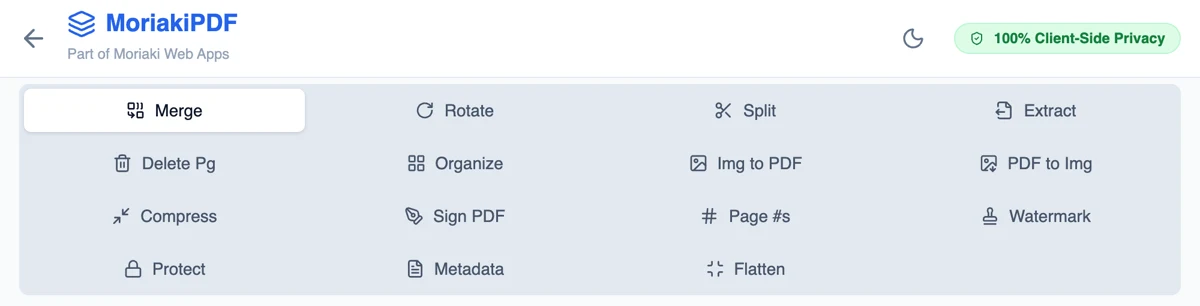
Find the right one for your task
- Send several files as oneMerge
- Make a file small enough to emailCompress
- Sign a contract without printingSign
- Share only part of a documentExtract
- Break a document into separate filesSplit
- Fix sideways scansRotate
- Reorder, turn or remove sheets visuallyOrganize
- Turn photos into a documentImage to PDF
- Turn sheets into picturesImage converter
- Lock the answers in a filled-in formFlatten
- Mark a document as confidential or draftWatermark
- Number the sheets of a long reportPage Numbers
- Change the title or authorEdit Metadata
- Remove unwanted sheetsDelete
How it works
Every tool runs inside your web browser. When you add a file, your browser reads it into memory on your own device, does the work there, and hands you back a finished file to download. There is no upload step, because there is nowhere else for the file to go.
That is possible because modern browsers are powerful enough to read and rebuild documents in the standard file format (see the Library of Congress format description or Wikipedia’s overview). Read the full explanation in How Moriaki PDF Works.
Private by design
Most online converters ask you to upload your document to their server, and then you have to trust that it is deleted afterwards. Here, your files are never sent anywhere, so there is nothing to store, leak or delete.
There is no account to create, no email address to give, no watermark on your results and no daily limit. Once a tool has loaded, it even keeps working with your internet connection turned off.
Why this matters: The Hidden Dangers of Free Online Utilities.
Works on every device
The same tools work on laptops, desktops, tablets and phones, in any modern browser such as Chrome, Safari, Firefox or Edge. There is nothing to install and no app to download.
Because the work happens on your own device, very large files depend on how much memory it has. For everyday documents, results are usually ready in a moment.
Good to know
Results are new copies. Every tool gives you a new file to download. The files you add are never changed.
Name your downloads. Most tools have a filename box next to the download button, so you can give each result a clear name.
Chain them together. For bigger jobs, combine a few steps: join files with Merge, arrange them with Organize, then shrink the result with Compress before sending.
Learn more. Our articles explain compression, electronic signatures and file safety in plain English.
Who uses these tools
The same handful of tasks comes up again and again, whatever your job. Here is how different people tend to use the toolkit day to day.
Students combine lecture notes, shrink assignments to fit upload limits and turn photos of handwritten work into a single file to hand in.
Freelancers and small businesses sign contracts, add watermarks to drafts and send invoices without paying for a subscription.
Office and HR teams lock payslips with a password, remove internal pages before sharing and number long reports for meetings.
Teachers and trainers turn worksheets into images for slides, split long handouts into lessons and merge quizzes into one file to print.
Anyone handling private paperwork — bank statements, medical letters, ID scans — gets the job done without handing the file to a stranger’s server.
Whoever you are, the routine is the same: open a tool, add your file, adjust the options and download the result — usually in a few seconds, and always on your own device.
Frequently asked questions
Do I need to install anything?
No. Everything runs in your web browser on a computer, tablet or phone.
Are my files stored anywhere?
No. Files are processed on your own device and never uploaded, so there is nothing to store.
Is there a limit on how often I can use them?
No. There are no daily caps, no sign-up and no watermarks on your results.
Which browsers work?
Any modern browser, including Chrome, Safari, Firefox and Edge.