

Image to PDF — Convert JPG & PNG, 100% Private
Combine your JPG and PNG images into a single PDF in seconds, right in your browser. Your images are never uploaded. No accounts, no watermarks, no limits.
📄 Convert images to PDF →How to convert images to PDF for free
- Open the Moriaki image-to-PDF tool in your browser.
- Add your JPG or PNG images — drag and drop as many as you need.
- Reorder the images by dragging them into the sequence you want.
- Click Convert and download your PDF. Your images never leave your device.
Why convert images to PDF with Moriaki?
Turning receipts, photos, or scanned pages into one shareable PDF shouldn’t require handing your images to a server. Moriaki builds the PDF locally in your browser, so nothing is uploaded.
Each image becomes its own correctly sized page, in the order you choose — no watermark, no image cap, no sign-up.
Getting the best result from your images
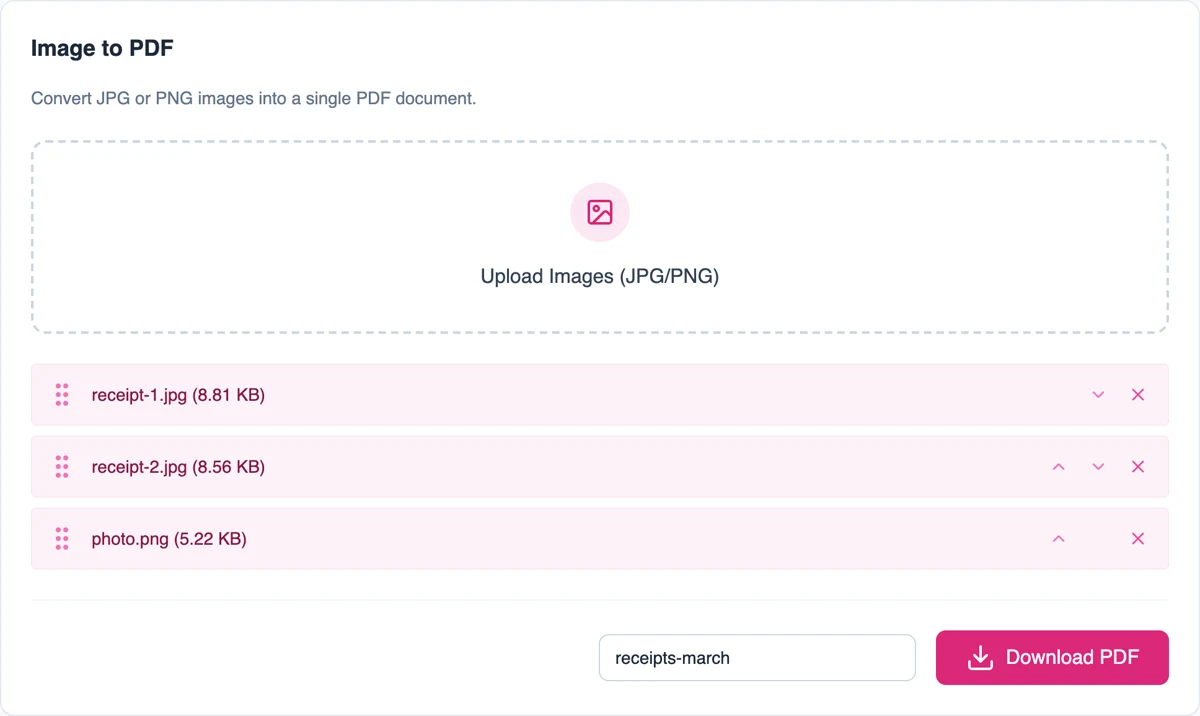
Each image becomes one page, in the order shown in the list. Drag an image by its handle or use the up and down arrows to change the order, and remove any you don’t need with the red cross.
Both formats work. JPEG is ideal for photos and phone pictures. PNG is better for screenshots, diagrams and anything with small text, because it keeps fine detail sharp.
Images are added exactly as they are, so a sharper photo gives a sharper document. Crop and straighten pictures on your phone first for the tidiest result.
When turning images into a document helps
Receipts and expenses. Photograph a week of receipts and send them as one file instead of a dozen attachments.
Scanned letters and forms. Phone scanning apps often save pictures. Combine them into one document that is easy to share and print.
ID and application uploads. Many online portals only accept documents. Turn the photo of your ID or certificate into one in seconds.
Portfolios and reports. Collect screenshots, sketches or photos into a single file you can present or attach.
How each image is placed
Every image gets its own page, sized to match the picture exactly. Nothing is cropped, stretched or squeezed onto a fixed paper size, and photos are embedded without being compressed again, so they keep their original quality.
Because the page matches the size of the picture, a large phone photo makes a large page. It looks normal on screen. If you need to print on standard paper, choose “fit to page” in your printer settings.
Other formats, such as HEIC photos from iPhones or WebP images, are skipped. Save or share them as JPEG or PNG first.
Private by design
Photos of receipts, IDs and signed letters are full of personal details. Here, the document is built inside your browser on your own device, so your pictures are never sent anywhere. Once the page has loaded, it even keeps working without an internet connection.
Read how that works in How Moriaki PDF Works, or why it matters in The Hidden Dangers of Free Online Utilities.
Good to know
Name the file. Type a name such as “receipts-march” in the filename box before downloading. Otherwise a default name is used.
Need it smaller? Phone photos can be large. Run the finished document through Compress before emailing it.
Add more later. To add another picture to an existing document, convert the new picture, then join both files with Merge.
Going the other way? To turn a document back into pictures, use the image converter.
Frequently asked questions
Is converting images to PDF free?
Yes — free, with no account, no limits, and no watermark.
Are my images uploaded?
No. The PDF is built entirely in your browser; your images never leave your device.
Which image formats are supported?
JPG and PNG images can be combined into a single PDF.
Can I set the page order?
Yes — drag the images into any order before converting.
Does it work on mobile?
Yes — it runs in any modern browser on phone, tablet, or desktop.
Does it work with iPhone photos?
iPhones often save photos as HEIC, which isn’t supported. Set Settings → Camera → Formats to “Most Compatible”, or share the photo as JPEG, then add it.
Will my photos lose quality?
No. Photos are embedded as they are, without being compressed again.
Is there a limit on the number of images?
Moriaki doesn’t set one. Very large batches depend on how much memory your device has.