

Merge PDF Online — Free & 100% Private
Combine several PDF files into a single document in seconds — entirely in your browser. Your files are never uploaded to a server. No accounts, no watermarks, no limits.
🔗 Merge PDFs now →How to merge PDF files for free
- Open the Moriaki PDF merge tool — nothing to install.
- Add the PDF files you want to combine — drag and drop as many as you like.
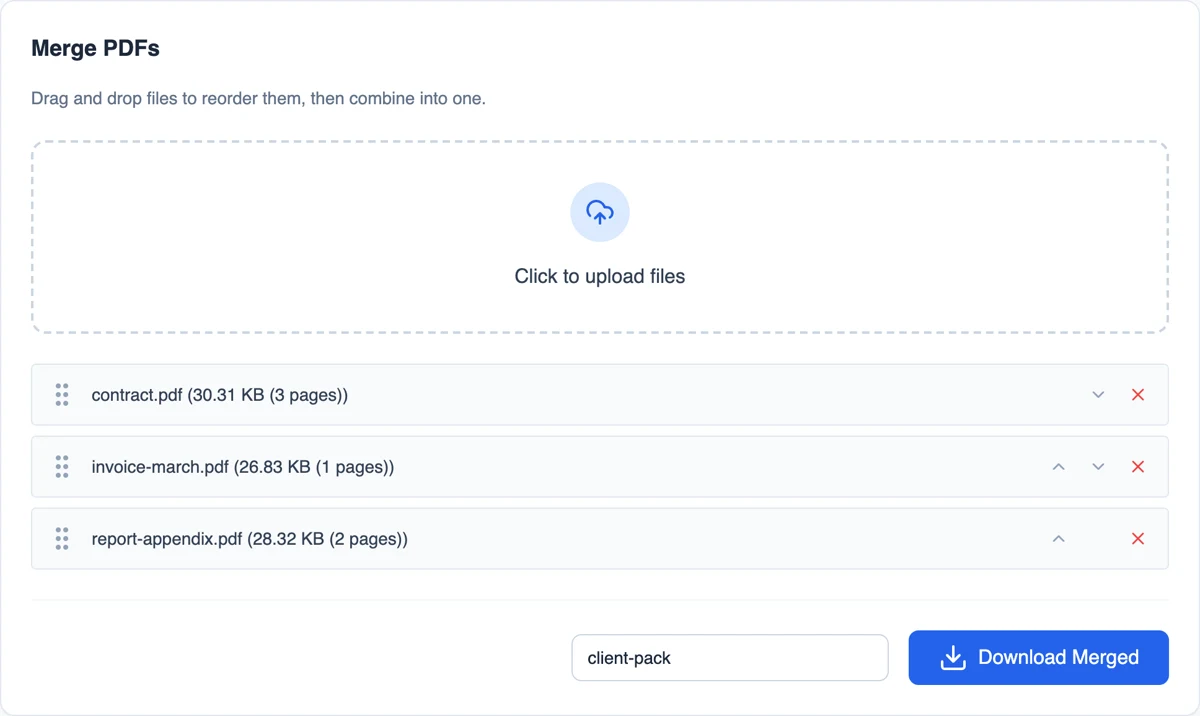
- Drag the files into the order you want, or use the arrows to reorder them.
- Click Merge and download your combined PDF. Everything happens on your device.
Why merge PDFs with Moriaki?
Combining contracts, invoices, scans, or report sections into one tidy PDF usually means uploading sensitive files to a stranger’s server. Moriaki does it differently — the merge runs locally in your browser, so your documents never leave your computer.
There are no page limits, no daily caps, and no watermark stamped across your merged file. Reorder pages exactly how you want before you export.
Getting the order right
Files are joined from top to bottom in the order they appear in the list. Drag a file by its handle, or use the small up and down arrows, to move it. The red cross removes a file you added by mistake.
Every part of each file is included, in its original order. If you only need some sections of a document, take them out first with Extract, then add the result here. If the finished file needs small adjustments, such as moving one sheet or turning a scan the right way up, open it in Organize.
When combining files helps
Applications and onboarding packs. Send a CV, cover letter and certificates as one tidy attachment instead of five separate ones.
Invoices and receipts. Collect a month of invoices into a single file for your accountant or expense report.
Reports with appendices. Join the main report, the appendix and the signed cover sheet so nothing goes missing.
Scanned documents. Many scanners save each scan as a separate file. Put them back together into one document in seconds.
What’s kept in the combined file
Each section is copied as it is, not re-drawn, so text stays sharp and searchable and images keep their original quality. The file format stores every part of a document as its own self-contained object (see the Library of Congress format description), which is why joining files doesn’t reduce quality. Different paper sizes are kept too, so an A4 letter and a US Letter invoice can sit in the same document.
A few things are worth knowing. Bookmarks (the clickable outline some long documents have) aren’t carried over. Files locked with a password must be unlocked before they can be added. The combined file also starts with fresh document properties, so set a title and author afterwards with the metadata tool if you need them.
Private by design
Contracts, invoices and ID scans are exactly the kind of documents people combine, and exactly the kind you shouldn’t upload to a stranger’s server. Here, everything happens inside your browser on your own device, so the files are never sent anywhere. Once the page has loaded, it even keeps working without an internet connection.
Read how that works in How Moriaki PDF Works, or why it matters in The Hidden Dangers of Free Online Utilities.
Good to know
Name the result. Type a name in the filename box before downloading, for example “client-pack”. Otherwise a default name is used.
Keep the size down. Joining many scans can produce a large file. Run it through Compress before emailing it.
Phones and tablets. It works in mobile browsers too. Very large files depend on how much memory your device has, since nothing is processed on a server.
Your originals stay untouched. You download a new combined copy. The files you added are not changed.
Frequently asked questions
Is merging PDFs free?
Yes — completely free, with no account, no daily limits, and no watermark added to your merged file.
Are my PDFs uploaded to a server?
No. The merge happens entirely in your browser on your own device. Your files are never sent anywhere.
How many PDFs can I combine at once?
As many as you need. There is no fixed limit — it is bounded only by your device’s memory.
Can I change the page order before merging?
Yes. Drag the files into any order (or use the reorder controls) before you click Merge.
Does it work on phones?
Yes — it runs in any modern browser on desktop, tablet, or mobile, with no app to install.
Can I combine documents with different page sizes?
Yes. Each section keeps its own size and orientation in the combined file.
Can I add photos as well?
This tool joins documents only. Turn photos or scans into a document first with Image to PDF, then add the result here.
Does it change my original files?
No. Your originals stay exactly as they were. You download a new copy with everything joined together.